Introduction: Logo Design Ka Naya Zamana
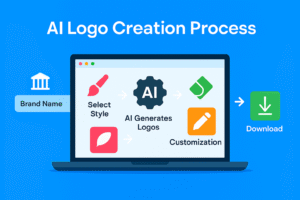
2025 mein branding sirf ek sundar design nahi, balki speed, accessibility aur smart technology ka combination hai. Pehle logo banane ke liye professional designers hire karne padte the, jo costly aur time-consuming process hota tha. Lekin ab free AI logo generator tools ne game badal diya hai.
Aaj ke digital era mein, logo sirf ek graphic nahi — yeh aapke brand ka pehla impression hota hai. Chahe aap ek startup founder ho, freelancer, ya content creator — ab aap bina design skills ke bhi professional-looking logo bana sakte ho. AI tools ne logo creation ko itna simplify kar diya hai ki aap sirf kuch clicks mein apna brand identity build kar sakte ho.
Is guide mein hum cover karenge:
- Top 8 free AI logo generator tools
- Step-by-step usage guide
- Design tips for standout logos
- Legal and copyright advice
- SEO-friendly internal and external links
Ye article aapko ek clear roadmap dega to build your brand identity — fast, free, aur smart way mein.
How Do Free AI Logo Generators Work?
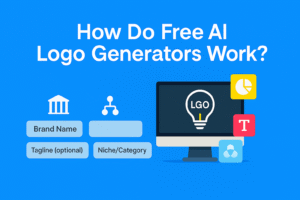
AI logo generators ek intelligent system use karte hain jo aapke inputs ke basis par multiple logo options create karta hai. Aapko sirf:
- Brand name
- Tagline (optional)
- Niche/category
- Style preferences (minimal, bold, playful)
…input karna hota hai. AI apne trained models aur templates ke base par 20–50 unique logo variations generate karta hai. Aap inhe customize karke PNG, WebP, ya SVG format mein download kar sakte ho.
Yeh tools machine learning aur design principles ka combination use karte hain. Kuch tools aapke niche ke hisaab se relevant icons suggest karte hain, kuch color psychology ke base par palette generate karte hain, aur kuch mockups bhi dikhate hain jisme aapka logo real-world usage mein kaisa lagega.
Common Features in Free AI Logo Generator Tools
| Feature | Description |
|---|---|
| Icon Suggestions | Niche-based relevant icons |
| Color Palette | Auto-generated brand colors |
| Font Combinations | Multiple typography options |
| Mockup Preview | Website, business card, T-shirt |
| One-Click Edits | Size, spacing, alignment |
Top 8 Free AI Logo Generator Tools (2025 Edition)
Note: Free tier features vary. Always check official websites for latest terms before downloading or using logos commercially.
1. Canva Logo Maker
- Best For: Beginners and marketers
- Free Features: 250+ templates, AI suggestions, transparent PNG
- SEO Tip: Use Canva’s Brand Kit for consistent visual identity across platforms
- Link: https://www.canva.com
Canva ka interface simple aur intuitive hai. Aapko multiple font combinations, icon suggestions, aur color palettes milte hain. Free version mein transparent PNG download bhi available hai.
2. Hatchful by Shopify
- Best For: E-commerce brands
- Free Features: Fully free logo downloads in multiple formats
- Pros: Industry-specific templates for fashion, tech, food, etc.
- Link: https://hatchful.shopify.com
Hatchful beginners ke liye perfect hai. Aapko kisi account ki zarurat nahi hoti, aur aap instantly multiple logo variations download kar sakte ho.
3. Looka
- Best For: Professional previews
- Free Features: Unlimited previews and edits
- Limitations: High-res downloads are paid
Looka AI-based suggestions ke saath aapko real-time customization options deta hai. Free version mein preview aur edit kar sakte ho, lekin final high-res logo ke liye payment required hoti hai.
4. Zyro Logo Maker
- Best For: Ultra-fast creation
- Free Features: PNG download without watermark
- Cons: Basic editor
- Link: https://zyro.com/tools/logo-maker
Zyro ek minimalist tool hai jo aapko fast results deta hai. Agar aapko ek simple logo chahiye bina extra features ke, Zyro is a great pick.
5. Wix Logo Maker
- Best For: Website and logo combo
- Free Features: Free preview and customization
- Tip: Paid plan includes domain, hosting, and logo
Wix aapko logo ke saath website bhi banane ka option deta hai. Free version mein preview aur basic edits possible hain, lekin download ke liye paid plan lena padta hai.
6. LogoMakr
- Best For: Icon-based designs
- Free Features: Low-res PNG free, SVG paid
- Pros: Drag-and-drop editor
LogoMakr ka editor simple hai aur aap icons, shapes, aur text ko drag-and-drop kar sakte ho. Free version mein low-res PNG milta hai, lekin SVG ke liye payment required hoti hai.
7. FreeLogoDesign
- Best For: Quick startup drafts
- Free Features: Low-res PNG free
- Limitations: High-res paid
FreeLogoDesign aapko fast logo drafts banane mein help karta hai. Aapko multiple templates milte hain jo startup-friendly hote hain.
8. Turbologo
- Best For: Multiple quick variants
- Free Features: Unlimited previews
- Cons: Commercial license in paid plan
Turbologo aapko multiple logo options generate karke deta hai. Free version mein preview kar sakte ho, lekin commercial use ke liye paid license lena padta hai.
Explore More AI Tools: Ai Tools
Step-by-Step Guide — How to Use Canva Logo Maker
Canva is one of the most beginner-friendly tools. Yahaan ek simple process follow karna hota hai:
- Enter Brand Name — Keep it short and memorable
- Add Tagline — Optional, but useful for clarity
- Choose Niche — Helps AI suggest relevant icons
- Pick Style — Minimal, bold, elegant, playful
- Generate Designs — Canva shows 20–50 options
- Customize Colors and Fonts — Match your brand vibe
- Preview Mockups — Website header, T-shirt, business card
- Download Logo — PNG, WebP, SVG (based on plan)
Canva ka drag-and-drop interface beginners ke liye ideal hai. Aap real-time mein changes dekh sakte ho aur mockups ke through logo ka impact samajh sakte ho.
Design Tips for Professional-Looking AI Logos
AI tools aapko base design dete hain, lekin final polish aapke design sense se aati hai. Yahaan kuch tips hain jo aapko standout logo banane mein help karenge:
- Simplicity Wins: Avoid cluttered designs
- Font Consistency: Use maximum two fonts
- Color Psychology:
- Blue: Trust, professionalism
- Green: Growth, eco-friendly
- Red: Energy, passion
- Scalability: Logo should look good on both billboard and business card
- Grayscale Test: If it works in black and white, it’s versatile
Ek achha logo har platform par consistent lagna chahiye — chahe wo website ho, visiting card ho, ya merchandise.
Legal Tips — Copyright and Trademark
AI-generated logos bhi legal protection ke under aate hain. Agar aap apne logo ko long-term use karna chahte ho, toh kuch legal steps lena zaroori hai:
- Reverse Image Search: Check for accidental similarity with existing brands
- License Check: Some free logos are personal-use only
- Trademark Registration: For serious branding, invest in legal protection
Trademark registration se aapka brand legally secure ho jata hai. Yeh especially important hai agar aap paid campaigns ya merchandise launch kar rahe ho.
Where to Use Your AI Logo
| Platform | Recommended Format |
|---|---|
| Website Header | SVG or PNG transparent |
| Instagram/Facebook | Square PNG |
| Business Cards | High-res PNG |
| Merchandise | Scalable SVG |
| Email Signature | Small PNG |
Logo ka format platform ke hisaab se choose karna chahiye. SVG scalable hota hai aur print quality ke liye best hota hai, jabki PNG transparency ke liye useful hota hai.
Internal Link Suggestions (SEO Boost)
External Link Suggestions
- Canva Logo Maker — https://www.canva.com
- Hatchful by Shopify — https://hatchful.shopify.com
- Zyro Logo Maker — https://zyro.com/tools/logo-maker
FAQs — Free AI Logo Generator Tools
Q1: Kya free AI logo commercial use ke liye allowed hai?
Yes, lekin har tool ka license alag hota hai. Terms zaroor padhein.
**Q